| Author |
Message |
| Registered: March 10, 2018 |  Posts: 14 Posts: 14 |
| | Posted: | | | | Hello.  If I have previously written in the above picture kind, updated profiles this particular below piece of text If there is something in the profile that needs fixing, please tell me so that it is easier for me to fix it. So Why are these rejected again and again multiple times. Without being given information to me, that what is wrong with the profiles, so how could I even correct the informations, when I don't know the reason for the rejections ?  |
|
| Registered: November 24, 2008 | Reputation:  |  Posts: 1,386 Posts: 1,386 |
| | Posted: | | | | You need to more specific about what you are correcting.
If you have noticed a problem in the credits, "Cast & Crew taken from closing credits of the film" would be good. (If you have done so, of course.)
If you have added the correct Overview from the cover, say so: "Actual Overview as found on cover", for example.
If you have correct the Country of Origin, say so etc.
I hope this helps. |
|
| Registered: March 13, 2007 | | Reputation: |  Posts: 1,495 Posts: 1,495 |
| | Posted: | | | | Quoting Tommi6: Quote:
Hello.
If I have previously written in the above picture kind, updated profiles this particular below piece of text
If there is something in the profile that needs fixing, please tell me so that it is easier for me to fix it.
So Why are these rejected again and again multiple times. Without being given information to me, that what is wrong with the profiles, so how could I even correct the informations, when I don't know the reason for the rejections ? You are expected to have read and followed the contribution rules. Be as specific as possible as to why you are making the changes and state sources. The reviewer most likely does not have the disc you are making changes to, therefore can't tell you what need fixed. "They" are relying on you to document your changes and why you are making them. (for example, if you change the rating or rating detail, state the source of the change) | | | | Registered: February 10, 2002 | | | | Last edited: by greyghost |
|
| Registered: September 29, 2008 | | Reputation: | | Posts: 2,681 |
| | Posted: | | | | I the instance of the Avatar profile, you're contributing images that are about 1/2 the size of the current profile's images. Why? The current ones are fine. You also didn't "cut off any excess material", you just shrunk the current images. When that's the only change you're contributing, of course it will get declined because you're shrinking the current images by 1/2! And as Greyhulk said, specify the source of your data (not images) changes. From the disc/disc credits, back cover for overview, etc.
For Happy Feet, you added birth years but didn't specify where they came from (the accepted BY thread is the right answer). | | | My one wish for the DVD Profiler online database: Ban or remove the disc-level profiles of TV season sets. It completely screws up/inflates the CLT.
FACT: Imdb is WRONG 70% of the time! Misspelled cast, incomplete cast, wrong cast/crew roles. So for those who want DVD Profiler to be "as perfect as Imdb", good luck with that.
Stop adding UNIT crew! They're invalid credits. Stop it! | | | | Last edited: by huskersports |
|
| Registered: March 10, 2018 | | Posts: 14 |
| | Posted: | | | | Here is the link for the example white chicks covers, why i have been cutting excess material from cover pictures, background is intentionally gray so that the excess material stand out better.  https://i.imgur.com/EbzNCBL.png |
|
| Registered: February 8, 2011 | | Reputation: |  Posts: 1,249 Posts: 1,249 |
| | Posted: | | | | Looking at the White Chicks contribution.
I only see new covers, no data is contributed (probably you forgot to check the checkboxes).
For the covers. The new front cover seems to be cropped a bit better, however the image size must be at least as large as the existing online cover (500x707) according the rules and your front cover (496x697) is smaller. Same goes for the back cover. So at the end the new covers are not better.
My suggestion is to make new scans from both covers. So you can match the image size and at the same time you can improve the resolution as well.
As said, there's no data contributed, but looking at the notes
-Maybe you can specify the SRP bit more with a source.
-Media company is probably ok
-Description must match the back cover, only if that's missing you can write your own version.
-Cast & Crew: It looks like it's not specific enough. Copy them from an approved profile and name the EAN from that profile or take them from the disc credits. If you change a common name and/or add a birth year you can link to the specific post for that common name/birth year. |
|
| Registered: March 10, 2018 | | Posts: 14 |
| | Posted: | | | | Is there anything wrong with this white chicks profile now, I updated the cover photos to much better quality ones ? |
|
| Registered: February 8, 2011 | | Reputation: | | Posts: 1,249 |
| | Posted: | | | | I think I made a little mistake in my previous reaction. It looks like Invelos already scaled the contributed image to 700 pixels. however I'm pretty sure the last time the originals were to small as well, but you know best if the resolution and size for the contributed images are better.
I Still can't see the data you have contributed, but the images look better to me. |
|
| Registered: March 13, 2007 | | Posts: 1,287 |
| | Posted: | | | | Never mind | | | | IVS Registered: January 2, 2002 | | | | Last edited: by Lithurge |
|
| Registered: March 10, 2018 | | Posts: 14 |
| | Posted: | | | | Hello.  This very recently again, so i'm wondering does some one really reject these updates of mine over and over again. But example updates made by ellenbrook, are accepted much more easily. And most don't even bother to give me feedback publicly here on the forum, or even by private message. So that I know how to fix the things that are wrong with these profiles ? |
|
| Registered: March 13, 2007 | | Reputation: | | Posts: 1,495 |
| | Posted: | | | | Added EAN 5051160229416 to my collection so I could check out your contribution.
Notes follow:
Your changed region but did not state a source.
Although you did not change cast or crew notes state they came from the same profile (5051160229416). (that portion only needs to be filled out if you are change cast or crew and do not mention credits previously.)
Previous contribution from Dasa stated "-Disc regions checked with VSO." VSO Inspector is a tool which checks the region on the disc - disc taking precedence or the cover.
Making changes to the cast or crew and stating the source as the same profile will result (most likely) in a decline of the contribution.
As I replied earlier in the thread, please read and follow all the contribution rules and provide clear, concise
sources for the changes made. Extraneous notes concerning portions of the profile you did not change only leads to confusion.
Do not expect detailed notes on a decline, the reviewers most likely do no have a physical copy of the DVD available to them, nor the time to provide extensive notes.
I am just another user, not a reviewer or associated with the company. If you decide to contribute, you are accepting the responsibility to to provide sufficient, easy to follow information in the contribution notes to allow a proper decision for acceptance or denial. | | | | Registered: February 10, 2002 |
|
| Registered: February 8, 2011 | | Reputation: | | Posts: 1,249 |
| | Posted: | | | | As said your White Chicks covers look better, but are declined again. What was the reason they were declined? Make sure the picture you post is larger than the original. As said I think Invelos automatically resize the images, so I don't know if the original picture is larger, but looking at your Avatar contribution I now have a doubt. What I can see in the resources. Your front is 494x700 pixels why the original is 500x707. Same for the back cover. So both of your images look better but the size looks smaller. According the rules that's not allowed. So make sure the scans you make are like 2000x2828 or something like that and describe you made new scans which are larger, have better quality text is better readable etc. "I updated only this profile cover pictures much better quality then last time" is probably not enough. In the same contribution you've added notes for contributed data, but no data is contributed. If you don't add data, leave the notes out and leave the cast/crew field empty. 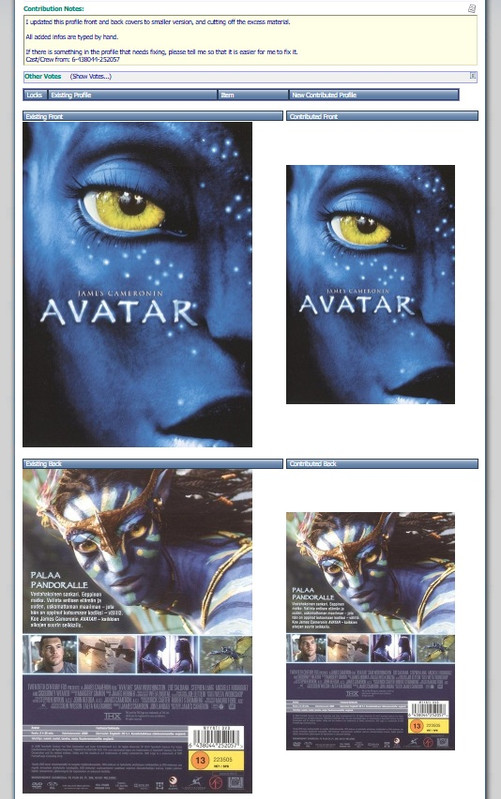 Contribution Notes: Quote:
I updated this profile front and back covers to smaller version, and cutting off the excess material.
All added infos are typed by hand.
If there is something in the profile that needs fixing, please tell me so that it is easier for me to fix it.
Cast/Crew from: 6-438044-252057 Your contributed images are way to small and not an improvement in comparison with the original, so they will be declined again for sure. Again leave the cast/crew field empty if you don't contribute cast or crew. |
|
| Registered: March 10, 2018 | | Posts: 14 |
| | Posted: | | | | Quoting Gamemaster: Quote:
As said your White Chicks covers look better, but are declined again. What was the reason they were declined?
No one gave me any feedback, on what the reason for the rejection was And this time the Avatar, EAN/UPC Code 6-438044-252057, this time front cover size is width 749 pixels x height 1068 pixels, back cover size is width 744 pixels x 1065 pixels So this time the size of the covers shouldn't be a problem anymore |
|
| Registered: March 13, 2007 | Reputation:  | | Posts: 780 |
| | Posted: | | | | Just checking @Tommi6: Do you have the image compression on? Open a random profile, go to the Cover Scans tab, and then File -> Adjust Compression. Set the Quality to 100.
I also sent you some feedback in a pm. | | | | Last edited: by marcelb7 |
|
| Registered: March 10, 2018 | | Posts: 14 |
| | Posted: | | | | What was wrong with these profile updates this time, that they were rejected ?  |
|
| Registered: March 29, 2007 | | Posts: 1 |
| | Posted: | | | | I don't think it doesn't matter how large images you submit on 6415015508085 profile. There are very few differences after the image size are reduced.
The rules states: "Before submitting new scans of cover art, make sure your new covers are of significantly higher quality than the existing online images...". I think the emphasis is on the word significantly...
Wasn't there a rule at some point that the cover image size is limited to 500x700? |
|